PlanetJune Craft Blog
Latest news and updates from June

PlanetJune Blog: Latest News, Patterns and Tutorials

Commissions Review: 12 months

(If you’re not interested in reading this whole review, let me just mention now that I’ve added lots of exciting new design options to the Commissions List, so please click through to the list if you’d like to see what’s new, and maybe pledge towards one or more!)

It’s been a whole year since I launched my commissions model. In that time, I’ve designed 7 new patterns through this process, with the 8th almost completed. My Orca would have also been finished by now if my internet cable hadn’t been severed two weeks ago, making my life infinitely more difficult – I’m very relieved to be back online and back in action again today!

PlanetJune Commissions: 12 month review

The good news: I have so many ideas for new designs that I need some way to choose which to make first, and the commissions system is working as a useful tool to see which designs may be popular and which definitely aren’t worth my time to create at present. (It’s like a vote, except that you can pay for extra votes if you have a strong opinion.)

The current situation: Right now, I’m in the wonderful, if somewhat daunting, position of having 6 fully pledged designs in my commissions queue, waiting for me to make them. I haven’t bitten off more than I can chew there as I was careful to set the rules: designs are made sequentially, in the order they were commissioned, and each may take 6-8 weeks to complete.

The bad news: This long waiting list tells me that I’m still not even close to reaching the balance point with this commissions model – at the last review, I had 3 designs waiting to be created, and now I have twice that many stacked up. Something has to change so the queue doesn’t continue to grow by 3 designs every 6 months – I don’t want to have people pledging towards commissions that I won’t be able to start for a year or more!

Model Review

I really like that my model gives me the freedom to make changes incrementally, and to see what works and tweak what doesn’t. I’m hoping that within a year or two of further adjustments to the model, I’ll have a stable system where the commissions come in at a rate I can handle, and there are never more than a couple in the queue.

The way I see it, I have 4 drastic options to make that happen:

  1. Close the list until I’ve caught up with the waiting list.
  2. Raise the minimum pledge amount.
  3. Raise the total commission price.
  4. Raise both the minimum pledge amount and the total commission price.

I know I definitely don’t want to close the list, so option #1 is out, but I don’t want to raise the prices too much and make them too high for my average customer to participate in this process. I’m going to tweak the system again and monitor how that plays out before I consider a drastic price increase.

Design Review

I’ve had one idea that may help to slow the rush and allow me to bring down the numbers of designs in the waiting list, while still letting people have the fun of pledging and getting excited about new design ideas. I’m dramatically increasing the number of options available – hopefully this will spread the pledges so the designs get pledged more slowly, at a rate I can handle.

So, to kick this off with a bang, I haven’t taken down any of the existing options, and I’ve added a whopping 25 new options to the list!

A note about the new designs: to keep it easy to use, I’ve just put the main animal name in the list. However, if there are several varieties of that animal and you want to know what I have in mind, just click its name on the pledge chart – it’ll open the Wikipedia page to the variety of the animal I’m planning to make:

PlanetJune Commissions: now with links to Wikipedia

e.g. when the list says Coati, I’m actually talking about a South American (Ring-Tailed) Coati (there are also White-Nosed and Mountain Coati species, and they look very different). Putting all that info on the list would be a bit unwieldy, but if you click ‘Coati’, you’ll go to the South American Coati page on Wikipedia and get a better idea of what I have in mind for my coati design πŸ™‚

I really don’t know what’s going to happen with this huge new list of options… My hope is that it’ll filter out the strongest candidates for patterns, but I could end up with an even longer waiting list of commissions. And the new list is very long – it could be so overwhelming that it puts people off and the pledging dries up altogether. But I have to try things and see what happens!

Pricing Review

As I’m a little concerned that my plan could backfire and I could have 25 more fully pledged designs by tomorrow(!), I’m also making a small tweak to the pricing: I’m raising the total commission cost from $120 to $150. The minimum pledge amount is still unchanged at $6, so it’ll take 25 $6 pledges (or fewer people with larger pledges) to get a design fully funded.

The price increase will take effect immediately, but, for all six designs that had already been fully pledged at $120, I’m making up the difference with pre-pledges, so Orca, Red Panda, Sloth, Meerkat, Camel, and Armadillo are still all fully pledged. And for the AmiDogs, a $30 price hike is too much, so I’m upping their pre-pledges to $78 (so you can commission an AmiDogs breed for $72).

Long term, I’d like to add $3 increments above the $6 minimum, so you don’t need to jump from $6 to $12 to $18 if you want to increase your pledge. I just don’t have the time to code that at the moment, and it’s probably best to not change too many things at once anyway (so I can figure out what’s working and what isn’t), but intermediate pledge values may well be a feature I add at the next review.

Timeframe Review

This is a tough one. When I increased the time to 6-8 weeks per design, I didn’t think I’d actually need anywhere near that time to create the majority of the designs. I keep getting blindsided by circumstances beyond my control (health problems, loss of internet, etc) and I’m only just managing to keep within the 8 weeks at the moment.

I’m not going to alter the promised timeframe (as I can’t promise shorter and I don’t want to take longer), but I really hope that these external complications will lessen so I’ll be able to start to catch up on the pledged designs and shorten the waiting list by creating the patterns more quickly. It’s very frustrating, but I can’t go faster than my availability allows without a loss of quality in my designs and/or patterns, and that’s not a compromise I’d ever be prepared to make.

I am sorry that if you pledge for a design today, it will be many months before you’re asked to pay and still longer until you receive your pattern, but I hope you don’t let that deter you from pledging, if there’s a design you really want – the longer you wait to pledge, the more other designs could be funded before it, and then you’ll have to wait even longer for your pattern!

Go Forth and Pledge!

Please click through to the list if you’d like to see the 25 new design options, and maybe pledge towards one or more, if there are any you’d particularly like me to make! (And if you love all the ideas equally, please don’t feel obliged to pledge for everything – you can still support me just as well by buying the finished patterns from my shop as and when they’re ready.)

I’m really excited by all the new options – I can’t wait to see which turn out to be popular and which designs I’ll get to create!

Comments (6)

South Africa wildlife II

This post is part of my occasional series of photoblog posts about the wildlife and nature I see while living in South Africa.

Whale photography isn’t easy. Even though whales are huge, they don’t typically come close to shore, and they don’t often reveal more than a small glimpse of their bodies above the water. The best time of year for whale-watching in South Africa is around September-October, when the Southern Right Whales come into False Bay (the large bay to the east of the Cape Peninsula) to calve in the safe, shallow waters. But, even then, and even with a decent zoom lens, your best photos will likely look like this:
southern right whale
Yay – it’s a mummy and baby whale! (Yeah, you’ll have to take my word for that…)

They sometimes leap out of the water, but, by the time you have the camera ready, they’ve gone again. Even if they come ridiculously close, like this, you’ll have an amazing experience, but your photos will just show a dark grey blob in the water:
southern right whale
Is it a whale? A submarine? Driftwood?

You can see my first season’s attempt at whale photos in my previous post, but last year (our second whale season) we got very lucky with some very close-up views of the baby whales.

I could claim that these photos show a parent and baby, but I have no idea if that’s the case. Still, this is a baby whale tail:
southern right whale
…and this is a definitely a spouting blowhole!
southern right whale

Then we went for lunch, and somehow snagged an upstairs open-air seaview table, so I had a great vantage point when one of the babies started playing, leaping out of the water over and over again! As the photos don’t give the full effect, I’ve also assembled a couple of my photo sequences into looped animations for you, so you can get a better idea of the exciting whale-watching experience:

southern right whale animation
Baby whale animation

southern right whale

southern right whale

It looks a bit like an orca (killer whale) with that black and white colouring, doesn’t it? (Which is topical, as I’m just putting the finishing touches on my orca crochet design – it’s really nice to have some real-life whale experience to inspire me!)

southern right whale animation

The orca resemblance ends with the colouring – the Southern Right Whale is more than twice the size of a killer whale, at an unimaginable 15m/50ft long! In fact, these babies I’ve shown you are already about the size of adult orcas when they are born…

A little Southern Right Whale trivia: this giant of the sea is a baleen whale; it has baleen plates instead of teeth, and feeds by filtering seawater through the plates, trapping thousands of tiny krill inside its mouth.

southern right whale

southern right whale

I don’t know if I’ll ever get better whale photos than these, but I’m looking forward to trying again this year when the next whale season comes around: even if my next photos are terrible, having the opportunity to see whales up close is something to look forward to every year. They’re so unbelievably huge, it’s hard to comprehend it, and seeing these graceful giants in their natural habitat is a real privilege.

I hope you’ve enjoyed this wildlife post! Please do leave me a comment if so – I do love to hear from you…

Comments (13)

free pattern: Shamrocks

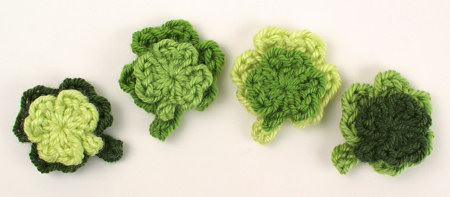
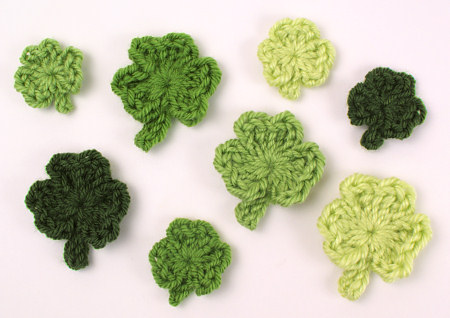
It’s Donationware time again! I’ve created a set of 2 beautiful shamrocks for you to crochet for St Patrick’s Day, or any time you want a splash of green in your life.

Shamrocks crochet pattern by PlanetJune

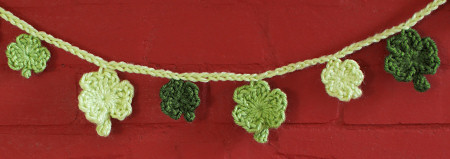
Shamrocks is a clever little pattern to make sweet shamrocks with a dimensional 3D effect, in two sizes: a realistically-shaped design, and a tiny miniature version. String them into a garland, attach one to a greetings card, add a pin back to make a cute brooch or lapel pin, or layer them for a novel look.

Shamrocks crochet pattern by PlanetJune

This pattern comes a few days later than I’d planned, thanks to a catalogue of disasters including broken internet at home (I’m currently in Dave’s office so I can actually post this!) but luckily, my shamrocks work up in minutes, so you still have plenty of time if you’re planning on some St Patrick’s Day decorations.

If you’ve made my ever-popular Love Hearts pattern, you’ll have no problem making Shamrocks – just like the Love Hearts, all the stitches of Rnd 1 are worked directly into the magic ring. The difference with the Shamrocks is that both sizes of shamrock are completed in just one round each, which makes them very, very quick to complete! I timed myself making the Mini Shamrock and it took 90 seconds (excluding weaving in the ends)…!

I really love this pattern – I hung the garland over my fireplace for this photo, but now I think I’m going to leave it up there for a while; it’s just so cheerful!

Shamrocks crochet pattern by PlanetJune

As I like to reward people who chose to donate for my donationware patterns, the PDF version of this pattern includes bonus crochet stitch diagrams for both shamrocks, in both right- and left-handed versions. As always, the pattern is free for you to use, and you need only donate if you’d like to thank me for my time in creating it, or if you’d like the easy-to-print PDF version.

I hope you enjoy my Shamrocks pattern!

Go to the Shamrocks pattern >>

Crochet-Along with us…

And here’s a bonus – a Shamrock is a definite sign of spring, so that means you can enter your crocheted shamrocks into this month’s Spring/Easter CAL – and maybe win the Suncatcher Eyes CAL prize! Check the PlanetJune Ravelry group for all the details πŸ™‚

Comments (4)

March update

PocketAmi Re-releases

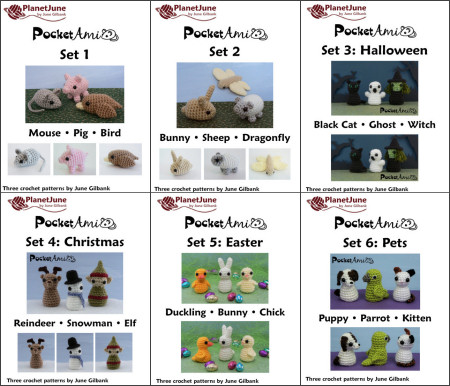
My pattern re-release project is making progress, and today the PocketAmi (individual Sets 1-6 and the multipack deal of Sets 1 & 2) are all available in the new format, and any you’ve previously purchased are ready for you to download! Log back into your PlanetJune account at any time in the next 2 weeks and you’ll see the download buttons for all your past PocketAmi pattern purchases have been re-enabled, so you can click and download the new versions.

PocketAmi amigurumi crochet patterns by PlanetJune

If you have any questions about the pattern reformat project, or you received the patterns through a different mechanism (and so don’t have an order for them in the PlanetJune shop) but you’d still like the new versions, I’ve set up a Pattern Re-Release FAQ that should answer all your questions. I’ll keep it updated throughout this project and add any further questions that arise.

Craft Business Help

I’ve amassed quite a collection of helpful information posts on various aspects of running a craft business, but I just realised they aren’t too easy for you to find, as my Craft Business category also included posts about my own business. To solve this, I’ve separated the old Craft Business category into My Craft Business and Craft Business Help. Now you’ll easily be able to find my helpful articles! Craft Business Help includes my advice on:

…and more! So if you’d like my advice that may help you with your craft business, check out the Craft Business Help category from the Categories menu in the right sidebar, or the Blog > View by Category menu at the top of this page πŸ™‚

Stash Replenishment!

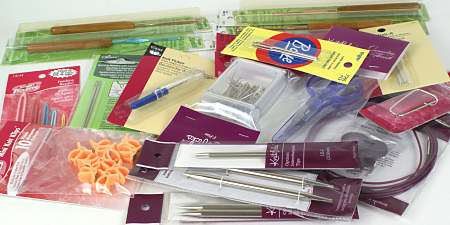
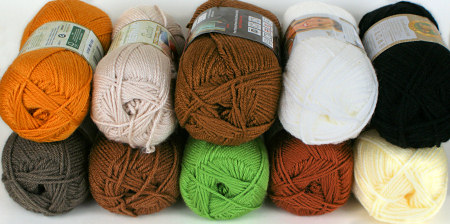
You may have guessed that one of the hardest things for me about living in South Africa is the lack of access to the craft supplies I’m accustomed to. So I took full advantage of my husband’s business trip to the US and restocked my stash a little – two years with no shopping is a very long time, so I had some catching up to do (within the limitation of suitcase size)!

Now I have new needles, hooks and notions to play with…
new yarn and notions from the US
New yarn shades for future amigurumi designs…
new yarn and notions from the US
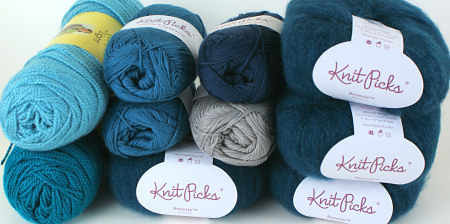
And some yarn for new accessories…
new yarn and notions from the US

Actually, the KnitPicks Reverie yarn (fluffy baby alpaca!) on the right is destined to become my next knitted sweater, but I don’t have any specific plans for the rest as yet. The funny thing is that I ordered my non-amigurumi yarn over several weeks from several different online shops, and I had no idea until I unpacked Dave’s suitcase that I seem to have something of a teal obsession going on – I picked all my yarn from the same colour family without realising it! I guess that means you can expect to see several new teal-coloured PlanetJune Accessories popping up over the coming months/years…

Review and Win contest

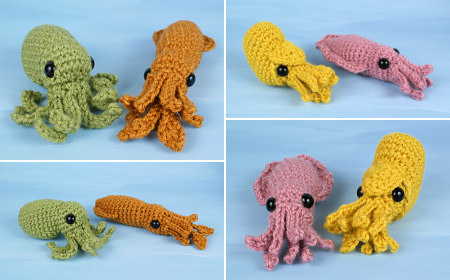
February’s ‘Review and Win’ winner is Sara T, with her review of my Baby Cephalopods 1: Octopus & Squid:

baby cephalopods crochet patterns by planetjune: octopus, squid, cuttlefish, nautilus
Baby Octopus & Squid are on the left in these photos.

These are so much fun!! Directions are clear with lots of pictures, and the finished products are adorable. They worked up for me in about an hour and a half, and they are the cutest cephalopods I’ve ever seen! I am very satisfied with these patterns.

Congrats Sara – I’ll email you to find out which pattern you’d like as your prize πŸ™‚

Comments (1)

3 fuzzy chicks (brushed crochet revisited)

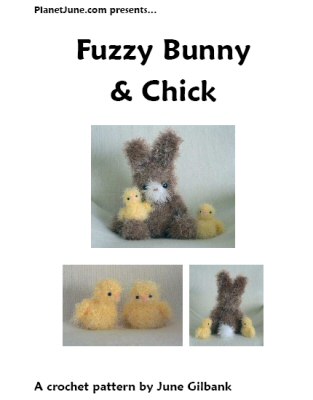
fuzzy bunny & chick crochet pattern by planetjune

When I designed my Fuzzy Bunny & Chick pattern in 2007, I used Bernat Baby Lash yarn for the chick. It was perfect – a curly-lashed eyelash yarn with a thick yarn core in the perfect shade of chick yellow – but, of course, that yarn has long since been discontinued.

I stopped designing with novelty yarns in 2008: the frustration of yarn-specific patterns (yarn not being available to the majority of my customers worldwide, and then getting discontinued with no suitable replacement) means it’s very rarely worth the hassle of using an unusual yarn in a pattern.

Still, my Fuzzy Friends patterns are good designs, and I’ve always felt it’s a shame there are so few yarns that would be appropriate replacements to use with my sweet little Fuzzy Chick pattern. So, after a little experimentation, I’ve come up with two easy options so anyone can make a very, very cute Fuzzy Chick – maybe even cuter than the original, do you think..?

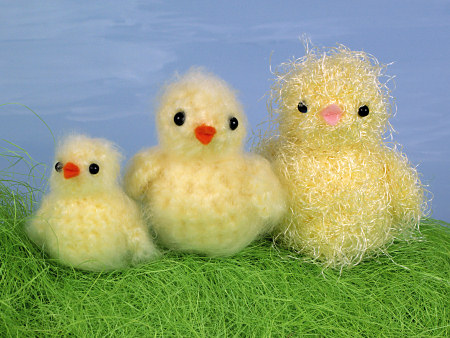
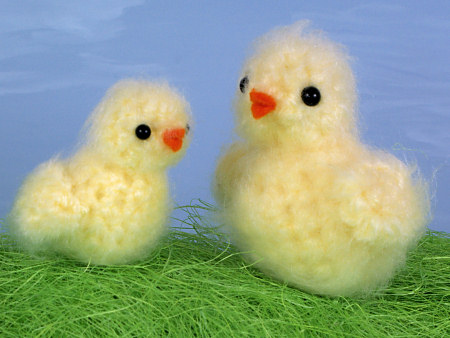
fuzzy chick crochet pattern by planetjune
L-R: Tiny Chick, Medium Chick, Fuzzy Chick (original)

The best part is that the new Tiny and Medium chicks both use standard everyday worsted weight acrylic yarn, so you can just use the same yarn you do for normal amigurumi! (Specifically, I used Bernat Satin in Banana for both chickies.)

Tiny Chick is just over 2″ tall, and uses worsted weight yarn, an E US/3.5mm hook, and 4.5mm eyes.
Medium Chick is 3″ tall, and uses 2 strands of worsted weight yarn held together, an H US/5mm hook, and 6mm eyes.

You can also use the above yarn/hook sizes as a starting point for any of my other Fuzzy patterns, if you don’t want to make them with a novelty yarn – this technique will work equally well with all of them!

A Miracle Brush

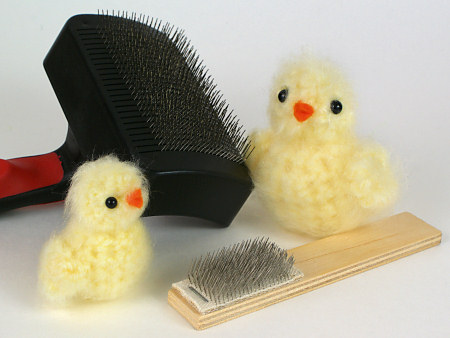
Let’s pause for a moment so I can tell you about my new amazing amigurumi brushing tool. I’ve seen it called a Teasel Brush (UK), Nap Riser Brush (US), and Bunka Brush (Japan) – if you google each of these names you should be able to find a stockist in your country under one or other of the names. Basically, it’s a very small wire brush with stiff angled prongs, used for brushing out the seams of teddy bears, brushing pile fabrics, or creating brushed areas in needlework or (of course) crocheted or knitted fabric. Some of these brushes slip over your finger, and others are mounted on a small wooden handle (like mine, below), but the prongs are the same in both cases.

teasel brush and pet slicker brush for brushing crochet
A small tool for a small job like a tiny chick makes all the difference – compare the size of my teasel brush (front) with the pet slicker brush (back).

Using one of these brushes follows exactly the same principle as using a wire pet brush to create brushed amigurumi, but, as it’s far smaller than a pet brush, it’s more suited to brushing detail areas and small amigurumi. I’ve left visible scratches in my thumbnail more than once when brushing my crochet with a large pet slicker brush, but, since I bought the smaller brush, I have finer control over where I’m brushing, and haven’t scratched up my nails once!

Of course, it does take longer to brush the same size area with a smaller brush, so, as usual, it’s your personal preference as to which type of brush is the best option. I’m happy to keep both in my toolkit now, and use the most appropriately-sized brush for the job at hand.

Making the Chicks

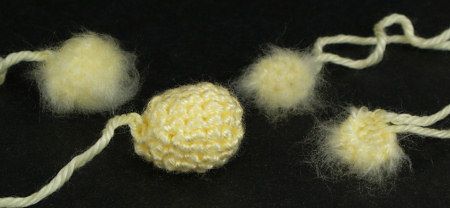
To make my chicks, I followed the original Fuzzy Chick pattern, together with the instructions from my Fuzzy to Brushed Crochet tutorial (you’ll have already received the tutorial as a bonus PDF if you’ve bought any of my Fuzzy patterns) but I brushed the chick pieces for longer than I did the bear in the tutorial, to get them nice and fluffy. This should give you an idea of the process:

fuzzy chick crochet pattern by planetjune
L-R: Head (brushed), Body (unbrushed), Wing 1 (brushed side up), Wing 2 (brushed side down)

As you can see, the pieces are very small after crocheting them, but the fluffiness adds to the size considerably after they are brushed. After brushing, my double-strand-of-worsted chick is almost as large as the original chick.

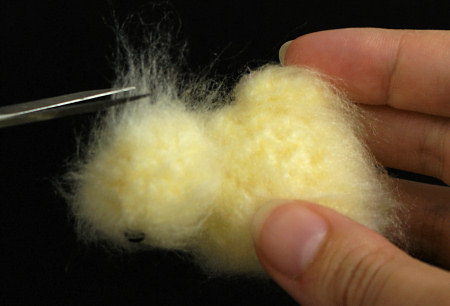
As the chicks are heavily brushed, I gave the fluff a little trim around the face (particularly the eye area) with a pair of small sharp scissors, to get rid of any extra-long fibres and neaten then up a bit.

fuzzy chick crochet pattern by planetjune

It’d be a bit fiddly to brush such small amigurumi with a pet brush, so, if you feel like small brushed amigurumi might be something you’d like to add to your repertoire, I highly recommend you seek out a Teasel/Nap Riser/Bunka brush to make the task less perilous!

fuzzy chick crochet pattern by planetjune

Now you know you can use any yellow yarn to make a Fuzzy Chick, how about making one – or a handful – of tiny chickies for the Spring/Easter crochet-along? The brushing probably takes longer than the crocheting, but with only 4 tiny parts, it’s still a very speedy project, and would be lovely for Easter…

Comments (5)

Ceph-Along CAL roundup

This month we took a trip under the sea with the Ceph-Along, featuring my new Baby Cephalopod patterns and their friends made from any of my other aquatic patterns.

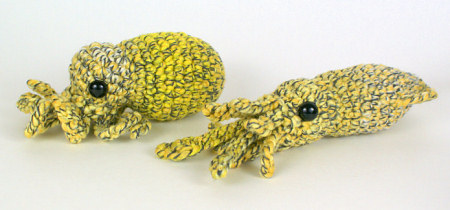
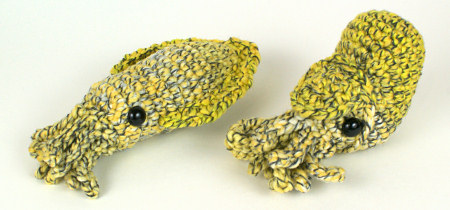
I decided to participate in this CAL myself with some crazy-cool variegated yarn I found. I wasn’t sure if the effect was going to be amazing, or just an amazing disaster, but it worked out as well as I hoped it would – you can almost see my baby cephs changing colour before your eyes…

baby octopus and squid by planetjune
baby cuttlefish and nautilus by planetjune
The verdict seems to be that this was a perfect use for a very unusual yarn πŸ™‚

Now, roundup time! (And don’t forget to keep reading to the end for the March prize CAL details…)

Read the rest of this entry »

Comments (4)

which is the ‘right’ side for amigurumi? [video]

Link easily to this tutorial in your patterns: www.planetjune.com/rightside

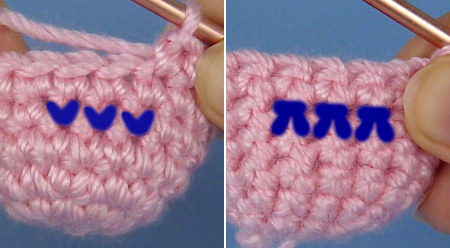
I’ve already written (in my Which is the ‘Right’ Side? tutorial) about how to tell the right side from the wrong side of your work when making amigurumi, and when it really matters which side you have facing outwards, but there’s value in showing it in video form too, so you can really see how a piece of amigurumi forms, and what your stitches look like from the front and the back.

which is the 'right' side for amigurumi video tutorial, by planetjune

(If you’re already comfortable with the right and wrong sides, when you can use whichever side you prefer, and when it really matters which side faces outwards, you can skip this video, if you like – there’s nothing extra that I didn’t tell you in my original which is the ‘right’ side discussion – but I’m building my crochet tutorials video library and that has to include the essential basics as well as clever tips and new techniques.)

And now to the video tutorial (in right- and left-handed versions, of course):

Which is the ‘Right’ Side for Amigurumi (right-handed)

Click to watch this video on YouTube.

Which is the ‘Right’ Side for Amigurumi (left-handed)

Click to watch this video on YouTube.

Note: The videos may look a little small embedded in the blog: if so, you can fullscreen them or click through to YouTube to watch them full-sized πŸ™‚

If you enjoy my crochet tutorial videos, please help to spread the word about them, and/or subscribe to the PlanetJune YouTube channel.


The Essential Guide to Amigurumi book by June Gilbank

Loved this tutorial? I have so many more amigurumi tips and tricks to share with you!

Boost your amigurumi skills with my latest book, The Essential Guide to Amigurumi, your comprehensive guide to amigurumi techniques and tips.


Do you find my tutorials helpful? If so, please consider making a contribution towards my time so I can continue to create clear and concise tutorials for you:

Thank you so much for your support! Now click below for loads more crochet video and photo tutorials (and do let me know what else you’d like me to cover in future tutorials…)

See more helpful PlanetJune crochet tips and technique tutorials

Comments (4)

selling crafts and patterns online

If you’d like to sell your own patterns or handmade goods online, there are many options open to you. It can be intimidating, especially if you’re just starting out, to figure out which venue is the best fit for you. As I’m always getting emails asking for advice about this, I thought I’d put together an overview of some of the major options, with the main positive and negative points of each.

selling your crafts and patterns online

For this post, I’m going to look at the pros and cons of online craft marketplaces (like Etsy), online pattern marketplaces (like Ravelry), a PayPal shopping cart on your own blog/website, and creating your own self-hosted shop from scratch.

Online Craft Marketplaces

Online craft marketplaces like Etsy were primarily designed for people to sell handmade goods, but you can also sell patterns through them. (In some cases this can be a disadvantage for pattern sellers: no matter how clearly you phrase your title and description, you’ll still receive orders from people who don’t read them at all and buy a pattern thinking they are going to receive a handmade toy…)

As Etsy is so popular, I’ll go into a little more detail with some pros and cons of an Etsy shop.

Pros:

  • Very popular, so you have access to a lot of traffic
  • Easy to set up listings and add photos
  • No setup fees: you only pay for each item you list
  • Can enable automatic re-listing for pattern sales
  • Possible digital file download service in future (currently in beta testing) or you can sign up for CraftHub as a digital download service

Cons:

  • Fee to list each item (currently 20c), whether or not it sells
  • Listing expires after 4 months, and you have to pay to relist it
  • Percentage fee on every sale (currently 3.5%)
  • With so much competition, it can be difficult to stand out
  • Listings get buried very quickly and are only found if someone is searching for that specific thing (e.g. “fox amigurumi pattern” has 73 results; “amigurumi pattern” has over 10,000)
  • Your potential customer needs to create an Etsy account in order to purchase from you
  • Automatic digital file delivery (for pattern sales) is only available for a fee

Other Marketplaces:
ArtFire is similar to Etsy, but there are no listing or success fees; instead you pay a fixed monthly fee, no matter how many items you list and how much (or little) you sell. Customers can buy without creating an account. There’s no option for digital file delivery.

There are also other options, including BigCartel, Storenvy, Shopify, and many more. Each has a different fee structure, different customization options, and are suited to different types of products. Your best option is to shop around and read all the information you can on each before making your decision.

International Marketplaces:
The options I’ve mentioned so far have all been US-based, but most, if not all, welcome sellers from around the world. However, if you’re not based in North America, you may wish to consider opening a shop with an online marketplace located in your own country. You can receive payments in your own currency, and if you sell physical products, selling to locals keeps your shipping costs lower, which may make your products seem more attractive!

You’d need to find an appropriate marketplace for your own country or continent – here are a couple of popular examples:

  • Folksy trades in British pounds and is for UK-based sellers only.
  • DaWanda is available to worldwide sellers, but primarily caters for the European market, with payment in Euros and site translations in English, German, French, Spanish, Italian, Dutch and Polish.

Online Pattern Marketplaces

Ravelry and Craftsy both provide a marketplace exclusively for patterns. This can be an effective solution for many pattern sellers. It’s very low maintenance, as, once you’ve uploaded your patterns to their server, your customers can automatically download their patterns after paying.

  • Ravelry is for knitting and crochet patterns only. It gives you access to over 2 million Ravelry users, plus anyone else you bring in from your blog, social media, etc. It has a very reasonable sliding scale monthly fee structure (and it’s free if you sell under $30/month). Customers don’t need a Ravelry account to be able to buy from you.
  • Craftsy is for any kind of patterns and has zero fees at the time of writing. It is still new, so may not have a large customer base as yet – you may need to bring in much of your own traffic. Your customers will need to create a Craftsy account in order to purchase.

And an added bonus: as these venues are for pattern sales only, the chance of someone thinking they are buying a finished item instead of a pattern is much lower (although I hear it still happens, on Craftsy at least).

PayPal Shopping Cart

If you already have a blog, a PayPal shopping cart may be a good way to introduce for-sale items to your website and customers. (This is how I started out, in 2007!) You can either create a post or page for each item, or have one ‘shop’ page listing all your items. For each item, you’ll create a PayPal button that people can use to add it to a PayPal shopping cart, and then check out through PayPal.

It’s a good transitional move for a blogger – it’s easy to set up, and there are no fees (beyond the PayPal fees you’d also be paying with any of the other options in this post). However, if you don’t already have a blog and don’t want to start blogging anyway, I’d advise against starting a blog or website just so you can use a PayPal shopping cart.

Using a PayPal cart instead of a ‘real’ shop makes you look like a very small business, which may deter some people from buying from you. (If you already have an audience who trusts you, that shouldn’t be a problem though – and you can always move on to another option if/when things take off!)

I wouldn’t advise a PayPal cart as a long-term solution if you’re serious about growing your business and aren’t just selling a few items as a hobby business; as it’s just a shopping cart and not a full shop, it’s very limited. If your business is successful and/or your catalogue grows, you’ll get frustrated with having to create a new PayPal button for each item you create. You also have no way to track orders beyond your payment notification emails and PayPal account records, so you’ll have to download your PayPal transaction logs into a spreadsheet if you want to generate any reports about how well you’re doing, or get your sales totals for your tax return.

Self-hosted eCommerce Site

If you have your own website, you can install eCommerce software to create your own shop (Wikipedia has a comparison of many options). This option gives you the most control over your shop, and potentially costs the least (in money, at least) but requires a time investment or a cost to hire someone else to set up your shop.

I use Zen Cart for my shop, and I like it, but I’m not sure I’d recommend it to others. On the plus side, it’s completely free, and I can change it to look and work exactly the way I want it to – it works well for my needs. I can offer instant pattern downloads; I have sales reports at my fingertips; it costs me nothing except my monthly web hosting fee. But I don’t generally recommend it to other people for these reasons:

  • Time: It takes a lot of work to set up initially – it took me 2 weeks of full-time work to get my shop ready to launch. And every time I want to change something, I have to schedule in more time to make the changes (there’s a reason why my shop still isn’t branded with my logo, almost a year after the logo launch…)
  • Tech Skills: If you want to make tweaks and updates to your shop, you need to get more into the code side of things – it’s not very user-friendly. If you’re not familiar with HTML (the code that webpages are written in) I’d suggest you either find someone to help you with that side of things, or avoid Zen Cart.

You could get away with using default templates that come with the software and doing very little in the way of modifications, but then your shop won’t look like it’s yours, and branding is very important – you want your customers to remember you! Or you could hire a web designer/developer to create and install your shop for you (for a one-off fee), but that’s a steep investment if you’re just starting out.

So, if you’re not a very technical person or don’t have the time or inclination to delve into code, I’d recommend you use a simpler option like a marketplace store.

Alternatively, you could look into a best-of-both-worlds solution like Ecwid, that allows you to set up a store on your own domain without doing any coding. You’d get the advantages of having your own store, branding, and control, with the ease of an online marketplace for creating your listings. However, you do have to pay a monthly fee for this convenience.

My Experience

I can tell you that setting up multiple shops takes a lot of time, and maintaining shops on many platforms may take more in effort (and, potentially, in fees) than you get back in sales. If you’re spending time maintaining 5 shops, is that the best use of your time, or would it be wiser to free up more time to create more products?

You’d probably do better to concentrate your efforts on one shop, or two selling locations that make sense for your situation (e.g. one local and one international marketplace shop, or one marketplace shop and a shop on your own site).

This is my current situation:

  • I focus all my attention on my own self-hosted PlanetJune shop, and that’s where I see the bulk of my sales.
  • I maintain my Etsy shop, but only for advertising purposes, as many people search for patterns on Etsy and I want mine to show up in their searches. (I think of my Etsy fees as my advertising budget.)
  • My ArtFire shop is still open, but I don’t have time to maintain it and I’m in two minds about keeping it open – do I really need a third shop? (No.) But then, you can easily import Etsy listings into ArtFire, so I could update my shop relatively easily… I’m still on the fence about this one!
  • I closed my Ravelry shop, but continue to list all my patterns in their database with links back to my own shop, so my patterns show up in all the Ravelry searches, but I don’t have to maintain yet another shop.
  • I closed my DaWanda shop, as I just didn’t have time to add all my listings. Also, accepting payments in Euros was a hassle, and many customers didn’t speak English, which made communication difficult.
  • I haven’t set up a Craftsy shop, because my business strategy is to bring everyone to my own shop. The only thing Craftsy could offer me that I don’t already have is access to their customers, and for me, the work in creating and maintaining my presence there isn’t justified by the potential sales.

Those reasons make sense for me, but won’t necessarily apply to you if you don’t have a high-traffic website, you sell patterns but don’t have an instant download option, you don’t want to do any coding, you live in Europe, you just sell your work as a hobby, or countless other factors…

In Conclusion…

I hope you can see that there really is no one-size-fits-all solution here: every option has its advantages and disadvantages, and you need to decide what’s best for your unique situation, based on your business goals, your location, the type of products you sell, your technical ability, your budget, and the time you can invest – both initially, to create your shop(s), and then on an ongoing basis, for maintenance and processing orders.

Using an online craft/pattern marketplace has many advantages: it’s easy to get started and to list your items, and you’ll (hopefully) get lots of traffic via people searching that site. On the flipside, the costs are higher, people tend to associate their purchases with the site (“I bought it on Etsy/Ravelry”) instead of with you (“I bought it from PlanetJune”) so it’s harder to build brand loyalty, and you’ll have direct competition in the search results from other sellers who may offer similar products at lower prices.

Setting up a shop on your own site, with a simple PayPal cart or dedicated eCommerce software, means that you have fewer costs, less direct competition, and people know they are buying from you. The downside is that, if nobody knows about your shop, nobody will visit, so the onus is on you to spread the word. That’s really a subject for another post, but you can do this by: writing a blog with useful content that people want to read and share; making sure your site shows up in Google searches; being active on social media; handing out business cards with your web address; or countless other marketing strategies. The best-looking and most functional shop in the world won’t do you any good if nobody sees it…

Where and how you sell online is a big decision, and it’s worth taking the time to compare options and find the right platform for you before you delve into setting up your shop – it’s a lot of work to change to a different storefront and set up all your item listings again, and you don’t want to lose your existing customers by moving to a new web address.

If you’re considering selling online, or already have a shop but wonder what other options are available, I hope you’ve found this summary useful!


Have you used any of these options, or something different? What were the results? I’d love to know your online selling venue recommendations; for or against! Please feel free to share your thoughts and experiences in the comments…

Comments (23)

    navigation: arrow

    buy crochet patterns and accessories from my online store

    'Everyday Crochet' and 'The Essential Guide to Amigurumi' crochet books by June Gilbank

    Crochet video tutorials and step-by-step photo tutorials

    Free PlanetJune crochet patterns

    Frequently Asked Questions

    navigation: arrow

    Punchneedle Embroidery information, ebook & patterns

    Papercraft ebook & tutorials

    Free PlanetJune craft projects & tutorials

    PlanetJune Under the Sea CAL
    Ravellenic Games: Team PlanetJune
    PlanetJune Reindeer Games
    PlanetJune Temperature Snake CAL

    June Gilbank

    Hi, I'm June. Welcome to my world of nature-inspired crochet and crafting. I hope you enjoy your visit!

    If you'd like to get in touch, you can contact me here.
    crocheted Canadian flag by PlanetJune
    Proudly made in Canada!
    A fanned-out pile of the books Everyday Crochet and The Essential Guide to Amigurumi, with text 'The answers to all your crochet questions at your fingertips - find out more'

    Has my work helped you?

    You can also send me a donation through my shop, or simply click ♥ Support PlanetJune ♥ before you shop at Amazon, Etsy, KnitPicks, and more, and I'll make a small commission on your purchase, at no cost to you!

    Tip: This link is also in the footer of every page!

    Thank you so much for your support!