
PlanetJune by June Gilbank: Blog
PlanetJune Craft Blog
Latest news and updates from JunePlanetJune Crochet-Along FAQ
Every so often, we have a PlanetJune Crochet-Along (CAL) at the PlanetJune Ravelry group. It’s a lot of fun, a good way to make friends with other friendly crocheters from all over the world, and a chance to crochet the same patterns at the same time as others, ask questions, get help, and take cute photos of what you’ve made for everyone else to admire!
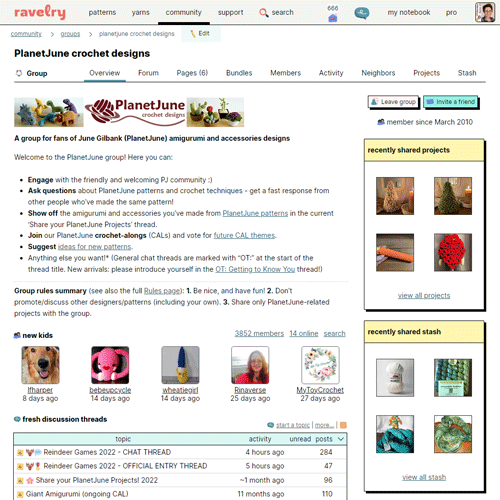
The PlanetJune group on Ravelry, where you can find pattern support, chat about crochet (and more), make new friends, and share your love of PlanetJune patterns!
Frequently asked questions about PlanetJune CALs
- What’s a CAL?
- Why Ravelry?
- How do I enter a PlanetJune CAL?
- How do I add a project?
- What sort of photo do I need?
- How do I add my project photo to the CAL thread?
What’s a CAL?
A CAL is where a pattern (or several) are chosen, and people crochet them at the same time.
The PlanetJune CALs are all decided by you – anyone can suggest themes for future CALs, and everyone gets to vote for the theme for each coming month. To take part, you pick a pattern from all the PlanetJune designs that fit the theme, get crocheting, post photos of what you’re making, and check in to see what everyone else is making.
Why Ravelry?
I run the PlanetJune CALs through my Ravelry group, PlanetJune Crochet Designs. Ravelry provides us with a place to post photos and a forum to post to and chat with each other. My Ravelry group is also the best place to post any questions you may have about amigurumi or my patterns – you’ll get a fast response from people who’ve made the same pattern and I can chime in if nobody else has an answer for you.
Note: It’s totally free to sign up for a Ravelry account, and I highly recommend it for anyone who crochets (and/or knits) – it includes a searchable database of pretty much every pattern and yarn in existence, so if you’re looking for something in particular it’s easy to find it. You can also see all the projects other people have made from the patterns or yarns (before you decide to buy them!) and their verdict on what they thought of it.
How do I enter a PlanetJune CAL?
- Sign up for a free account at ravelry.com. Add an avatar photo to your profile and any other details you want. (It’s nice for us to know at least your first name and country, but it’s not required!)
- Join the PlanetJune Crochet Designs ravelry group by clicking the ‘join this group’ button.
- Add a new project to your Ravelry notebook with your CAL entry (see How do I add a project?, below, for instructions.) You don’t need to fill in all the fields, but make sure you link it to whichever PlanetJune pattern you used and add at least one photo (see Photo Tips below). And don’t forget to include the official CAL tag (given in the first post of each CAL thread) in each project!
- Go to the CAL thread, hit reply, and post a message there with anything you’d like to say about your project and include the photo(s) of your project. You can add photos from flickr or other websites, or directly from Ravelry (see Add a Project Photo below).
- Repeat 3 and 4 for any additional CAL entries!
How do I add a project?
First things first, you need to add a project to Ravelry with details of your CAL entry. Here’s the easiest way:
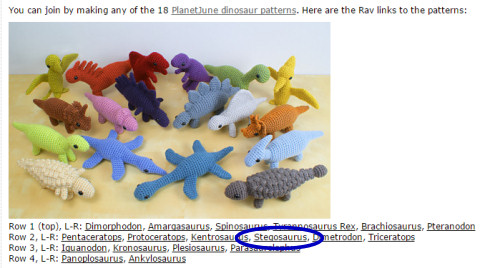
Step 1: Look at the first post of the CAL, where I give rav links to all the applicable patterns. Click the name of the pattern you’ll be working from:
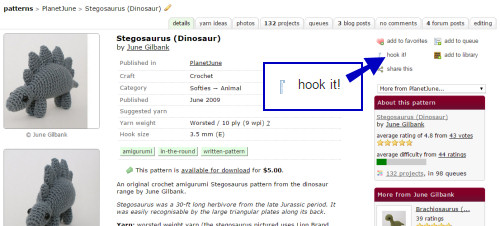
Step 2: Click ‘hook it’ UPDATE: it’s now called ‘create project’ near the top right corner of the page to start a new project with the pattern details pre-filled:
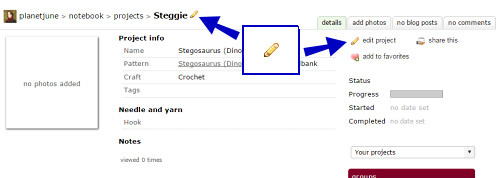
Step 3: To edit your project details, click one of the yellow pencil icons:
Step 4: Fill in the details for your project. You may add in as many details as you wish, but at minimum: name your project, add the PlanetJune pattern you used (if you didn’t use the pre-fill method above), give the project start date, and add the CAL tag (find it in the first post of the CAL thread):
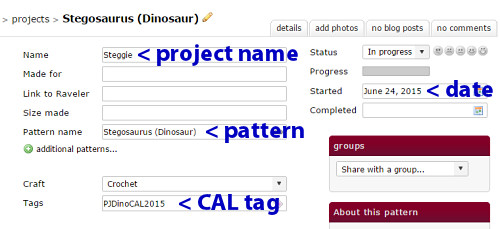
Step 5: Click ‘Save changes’ (at the bottom of the page).
Step 6: When you have photos ready to add, click the yellow pencil (see Step 3) then click the ‘add photos’ tab:
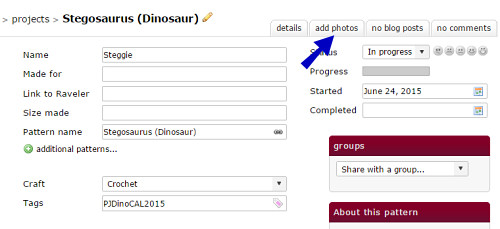
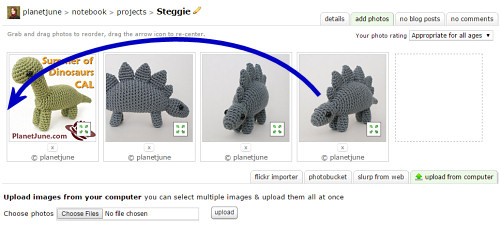
Step 7: Follow the instructions on the page to upload your project photos. Remember that the first photo on this page will be the one everyone sees, so make sure you move your best photo to the start:
Step 8: When your project is finished, click the yellow pencil (see Step 3) then change your project status to ‘Finished’ and add the date you completed the project:
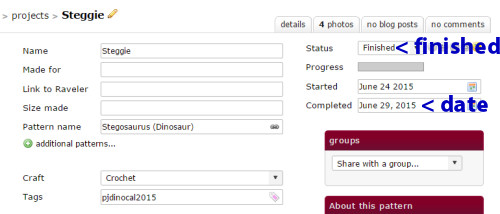
Remember to click ‘Save changes’ at the bottom of the page every time you add any information.
What sort of photo do I need?
Photo Tips: Take the best photos you can! Cellphone snaps are fine, but please try to make sure your project is in focus, in the middle of the photo, and reasonably well lit, so we can properly appreciate your work. 🙂
If you’d like some help or advice with your project photography, we have a Photography Tips thread for just that purpose!
How do I add my photo to the CAL thread?
Before you start, you need to add the photo to your project page.
Add a Project Photo: To add your photo from your Ravelry project to a forum post:
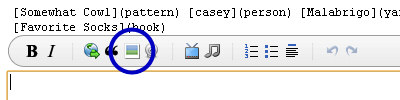
- Click the ‘image’ button (the icon looks like a Polaroid photo):

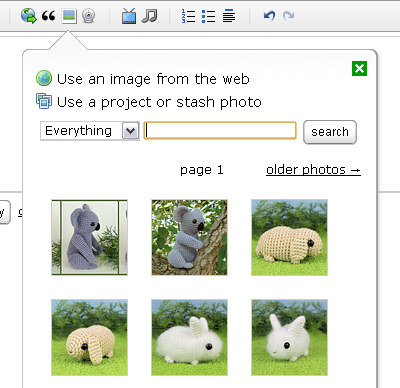
- Click ‘Use a project or stash photo’ – all your ravelry photos will show:
- Find the photo you want and click it, then click ‘use this photo’
Please ask if there’s anything else you’re unsure about. I hope we’ll see you in the PlanetJune ravelry group soon, and you’ll join us for upcoming CALs 🙂
2 Comments »
Leave a Reply
Quick Links: Crochet
Quick Links: Crafts







Welcome to PlanetJune!
Hi, I'm June. Welcome to my world of nature-inspired crochet and crafting. I hope you enjoy your visit!
If you'd like to get in touch, you can contact me here.





 Email newsletter
 RSS
RSS Twitter
 Facebook
 YouTube
 Ravelry: June
 Instagram
Delphine Eudora said
I entered PlanetJune ravelry group but I don’t know what to crochet!
June said
Delphine, why don’t you post a message in the group introducing yourself and asking for ideas – I’m sure everyone would be happy to help you decide 🙂